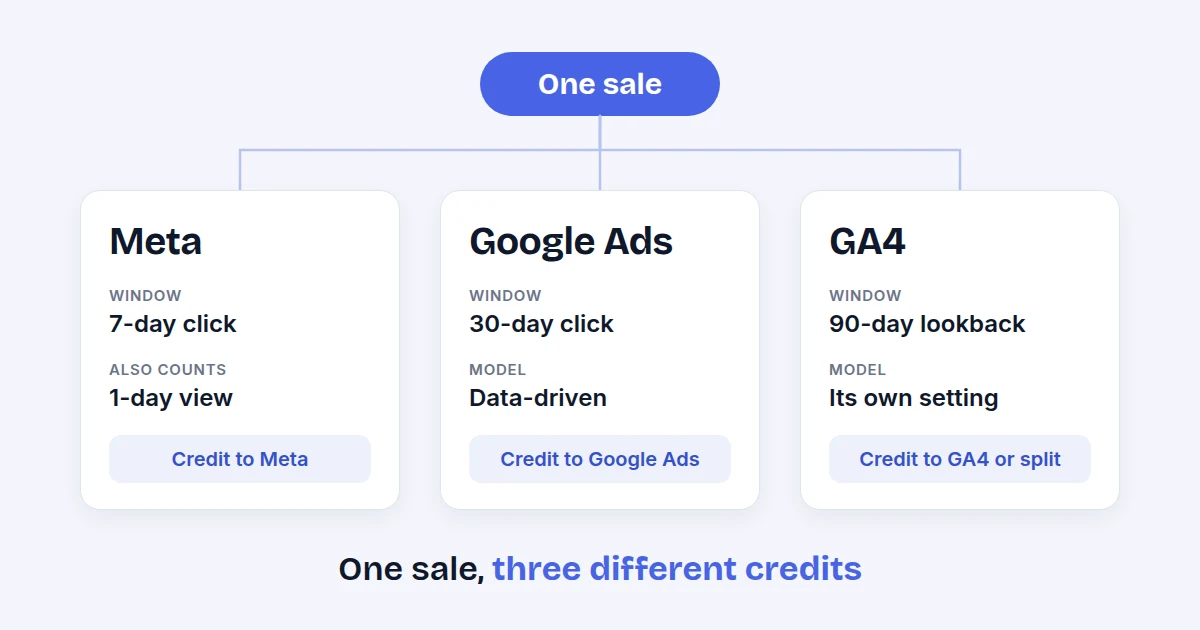
Meta, Google Ads and GA4 report different numbers because each one decides for itself which ad gets credit, how long after the ad a sale still counts, and which missing data it fills in with estimates. None of them is wrong.
Read each channel on its own terms, never add them together, and compare each one with its own past.
The same sale, three different stories
A shopper sees your ad on Instagram on Monday, clicks a Google ad on Wednesday and buys on Friday after typing your address. Meta can say its ad caused the sale. Google Ads can say its ad did. GA4 may credit a third source, or split the credit. All three are following their own rules, so all three reports are "right" for that rule.
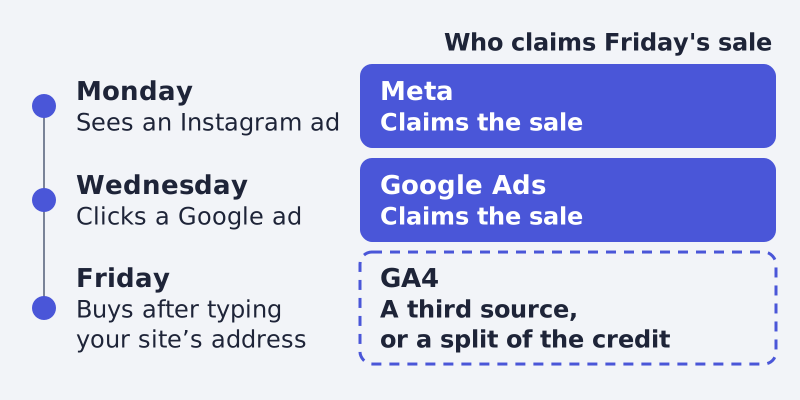
This is why the sum of the channels is usually larger than your real order count. Each platform reports the sales it can claim, and a sale that touched two platforms is claimed twice.
Reason 1: attribution windows
An attribution window is how long after an ad interaction a sale still counts for that ad.
- Meta credits an action to an ad when someone clicked or viewed it inside the attribution window (Meta Help Center). Its developer documentation lists the windows it reports: 1-day click, 7-day click, 28-day click, 1-day engaged view and 1-day view. The 7-day view and 28-day view windows stopped being returned by the Ads Insights API on 12 January 2026 (Meta for Developers).
- Google Ads has its own windows. For Search and Display the click window defaults to 30 days, engaged-view to 3 days and view-through to 1 day. You can set the click window anywhere from 1 to 90 days (Google Ads Help: conversion windows).
- GA4 has a lookback window per key event: 90 days by default for most key events (30 for first visit and first open), which you can change to 30 or 60 days for the others (Google Analytics Help: attribution in GA4).
A shopper who buys 20 days after the click is a Google Ads conversion on the defaults and invisible to a Meta report set to 7-day click. Neither report is broken.
Reason 2: click versus view
Meta can count a sale after someone only saw the ad, inside the view window (Meta for Developers, Meta Help Center). Google Ads keeps view-through conversions in a column of their own (Google Ads Help: counting options), with a default view-through window of 1 day (conversion windows). A report that includes view windows will always show more than one that counts clicks only.
If your Meta number is much higher than the others, check how much of it comes from the view windows before you suspect your tracking.
Reason 3: the attribution model
- Google Ads supports two models today: data-driven, the default for most conversion actions, and last click. The older rules (first click, linear, time decay, position-based) are retired (Google Ads Help: attribution models).
- GA4 lets you choose the reporting attribution model under Admin, in the attribution settings. Data-driven credit can be fractional, so you may see decimals in the key events column (Google Analytics Help: attribution in GA4).
- Google Ads counting is a setting per conversion action, "every" or "one" conversion per click. A shop usually counts every sale, a lead form usually counts one (Google Ads Help: counting options).
Two reports using different models on the same click will split the credit differently even if both see the same data.
Reason 4: modeled conversions and consent
Not every conversion can be observed. When a browser blocks third-party cookies, limits cookie life, a visitor refuses consent, or a purchase happens on another device than the click, Google Ads fills the gap with modeled conversions. They appear in the normal Conversions column, and Google says they can take up to five days to settle (Google Ads Help: modeled online conversions).
GA4 does something similar but on its own terms: for visitors who decline analytics cookies it estimates users and sessions from visitors who accept, and only when it has enough data, at least 1,000 events a day with consent denied for seven days and enough consenting users. Event counts such as page views are not modeled in standard reports (Google Analytics Help: behavioral modeling for consent mode).
Meta also lists modeled data as one reason its event counts differ from Events Manager's (Meta Help Center). The practical result: a Google Ads number can include estimates that GA4 does not, and the other way round.
Reason 5: time zones, scope and the date a sale belongs to
GA4 uses the property's time zone and Google Ads uses the account's time zone, and Google names a mismatch as a source of differences (Google Analytics Help: attribution in GA4). Meta lists time zone among its own reasons too (Meta Help Center). Check the time zone and the account currency of every account before comparing a day. A sale at 11:30 pm can fall on two different dates.
GA4 also credits paid and organic channels by default, while Google Ads defaults to Google paid channels only. To compare Google Ads with GA4, Google points to the "All conv." or "All conv. (by conv. time)" columns in Google Ads (Google Analytics Help: attribution in GA4).
What to do about it
- Pick one question per source. Meta and Google Ads answer "what did this channel's ads drive, by its own rules". GA4 answers "where did the visits and sales on my site come from". Your shop's own order data answers "how much did I really sell".
- Never sum the channels. The total will not match your orders. Put the channels side by side, never in one row.
- Keep the windows fixed. Do not change an attribution window in the middle of a test. Write down the window and model next to each number.
- Compare trends, not absolute values. If Meta's number goes up 20 percent and your orders go up 15, that is a signal. A gap between two platforms on one single day says little.
- Align what you can. Same time zone, same currency, the same key event definition for purchase, deduplicated tags. Then accept the rest as a difference of method.
- Check against the orders. A weekly look at the real order count and revenue from your shop keeps every channel honest.
FAQ
Which platform should I trust?
None of them alone. Trust your own order data for the total, and use each platform for what it measures best: its own ads' reach and cost, and GA4 for site behaviour.
How big a gap is normal?
None of the help pages above gives a figure, so no one can promise you a number. Some gap is expected once windows, models and estimates differ; a gap that keeps growing is worth checking for duplicate tags or a broken event.
Can I make the numbers match exactly?
No. You can narrow the gap by aligning the time zone, windows and counting, but the models and the modeled data stay different (GA4 attribution, modeled conversions).
Written by
Framepx team, Editorial team
The Framepx editorial team writes for brands, marketers and agencies about ad platforms, measurement, creative and product feeds.