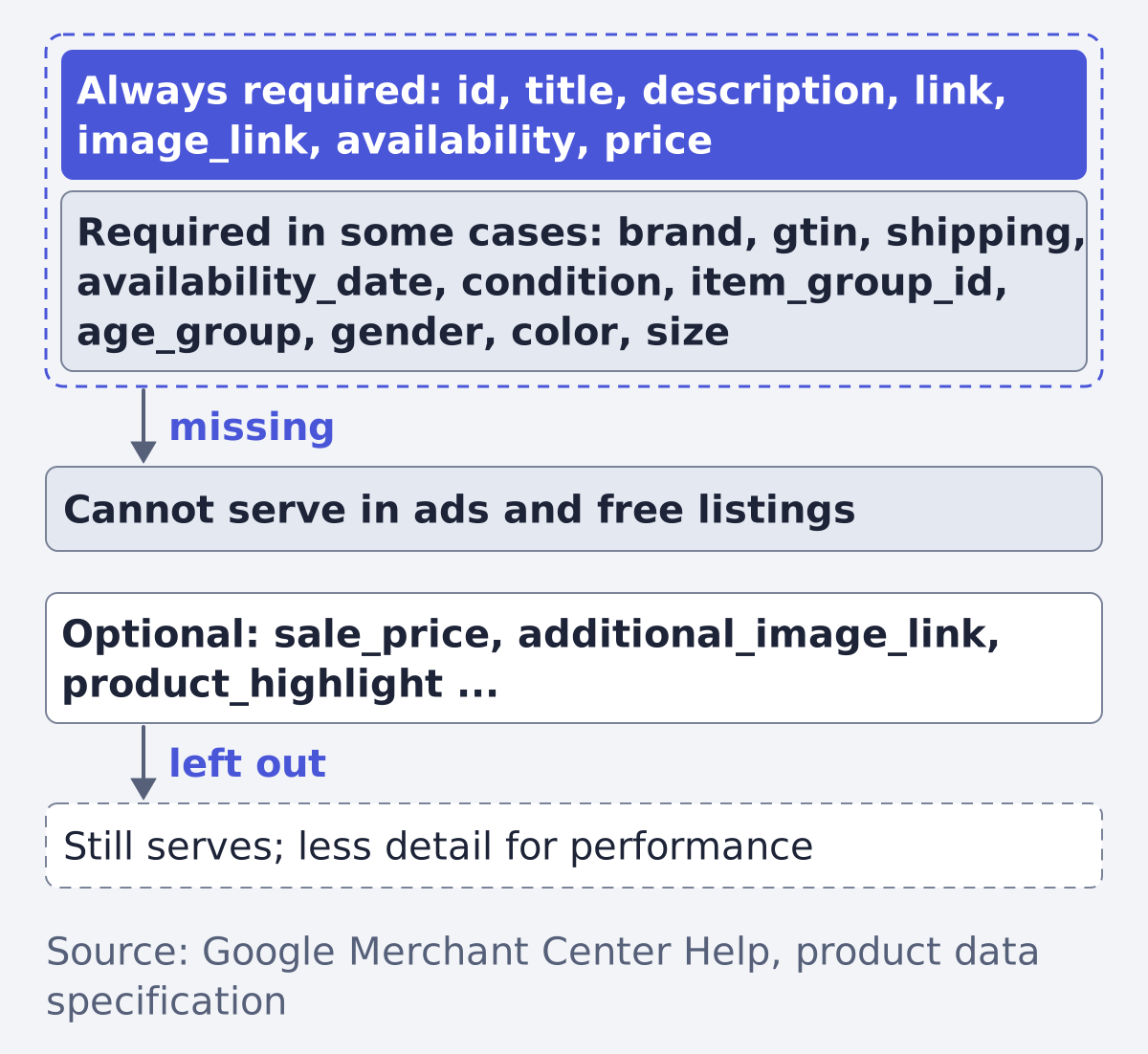
Google Merchant Center requires seven attributes on every product: id, title, description, link, image_link, availability and price. Some others are required only for certain products or countries, such as brand, gtin, color or size, and a missing required one means "your product won't be able to serve in ads and free listings" (Google Merchant Center Help: product data specification).
This applies to any brand that advertises products on Google, whether it sells shoes, furniture, tyres or books. The rules come from Google's own specification, and where a page is unclear we say so.
Required, recommended, optional: how Google labels them
Google marks each attribute on the specification page as required, optional, or "it depends". The page has no separate "recommended" tier. The nearest thing is the wording for GTIN, which it calls strongly recommended when the product has one (product data specification).
So read the three tiers like this:
- Always required: the seven attributes above. Every product needs them.
- Required in some cases: the attribute is mandatory when the product or the target country calls for it. Apparel in Brazil, France, Germany, Japan, the United Kingdom and the United States needs
age_group,gender,colorandsize, for example. - Optional: in Google's words, "you can submit this attribute if you want to help boost your product's performance", and a product serves without them.
Two formatting rules apply to everything: attribute names and supported values are submitted in English, and words in an attribute name are joined with underscores, as in image_link (product data specification).
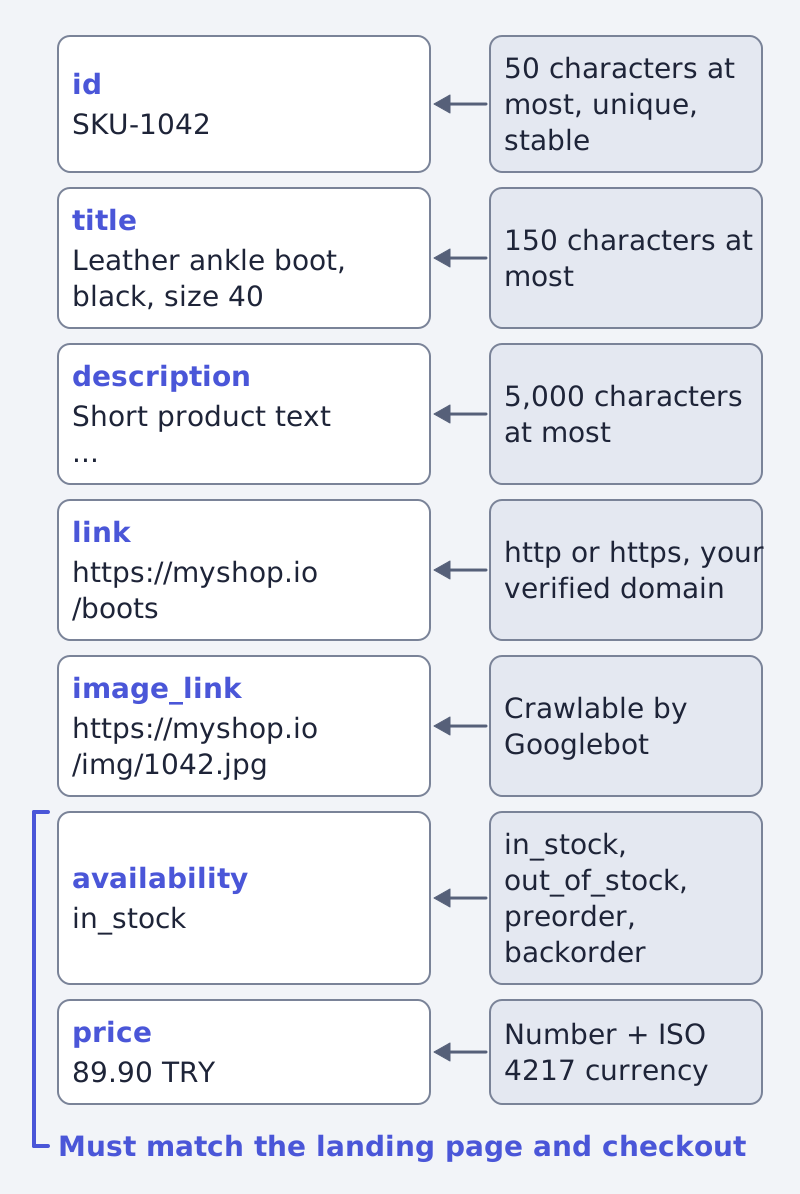
The seven attributes every product needs
| Attribute | What it holds | Format rule from the page | Source |
|---|---|---|---|
id |
A unique identifier, ideally the SKU | 50 characters at most, unique per product, stable across updates | 7052112 |
title |
The product name | Plain text, 150 characters at most; no promotional text or all caps | 7052112 |
description |
What the product is | Plain text, 5,000 characters at most; describes the product only | 7052112 |
link |
The landing page | Starts with http or https, on your verified domain | 7052112 |
image_link |
The main image | A URL Googlebot can crawl; JPEG, WebP, PNG, non-animated GIF, BMP or TIFF | 7052112 |
availability |
Stock state | in_stock, out_of_stock, preorder or backorder |
7052112 |
price |
The price a shopper pays | Number plus ISO 4217 currency, period as the decimal point | 7052112 |
Where an AI wrote the title or description, Google offers structured_title and structured_description in their place, with the same length limits (product data specification).
Three details trip people up:
- The values must match the page.
priceandavailabilityhave to agree with the landing page and the checkout. An out-of-stock item still has to show a price on the page. - Price zero is not allowed, except for mobile devices sold with a contract and physical goods sold only by subscription.
- A coming image rule. The page announces a minimum of 500 x 500 pixels for
image_link, enforced from January 31, 2027 (product data specification).
The ones that depend on the product
These are required only when they apply, and then missing them has the same effect as missing a required attribute (same page).
brand: required for all new products except movies, books and music recordings, 70 characters at most. Placeholders such as "N/A" or "Generic" are not accepted.availability_date: required forpreorder, in ISO 8601 form, within a year ahead.condition: required for used and refurbished items, optional for new.item_group_id: required for variants (the same shoe in three sizes) in Brazil, France, Germany, Japan, the United Kingdom and the United States.is_bundleandmultipack: required for custom bundles and multipacks in the listed countries.adult: required if the product has adult content.certification: required where energy-label rules apply (EU, EFTA, UK).warranty: required where local rules ask for warranty information, such as Quebec.shipping: shipping costs are required for Shopping ads and free listings in 21 countries, among them the US, the UK, Germany, France and Japan.
Required against recommended, by group
| Group | Required | Required in some cases | Optional (examples) |
|---|---|---|---|
| Basic product data | id, title, description, link, image_link |
warranty, shipping in 21 countries |
additional_image_link, video_link, mobile_link |
| Price and availability | availability, price |
availability_date for preorders |
sale_price, sale_price_effective_date, installment, loyalty_program |
| Product category | none | google_product_category for some categories |
product_type |
| Product identifiers | none | brand, mpn when no GTIN exists, gtin (strongly recommended if available) |
identifier_exists |
| Detailed description | none | age_group, gender, color, size, item_group_id, condition |
product_highlight, product_detail, dimensions, weight |
Source for every row: Merchant Center Help: product data specification. The page shows a "Required" icon on sale_price while its text says optional, so treat it as optional and check the live page.
google_product_category and product_type are optional in general. Send the category as a numeric ID, which Google recommends, or as the full path, never both. Only the first product_type value is used for bidding and reporting in Shopping campaigns.
GTIN, brand and MPN: the identifier trio
Identifiers are where most real feeds go wrong, so Google gives them their own page (GTIN help).
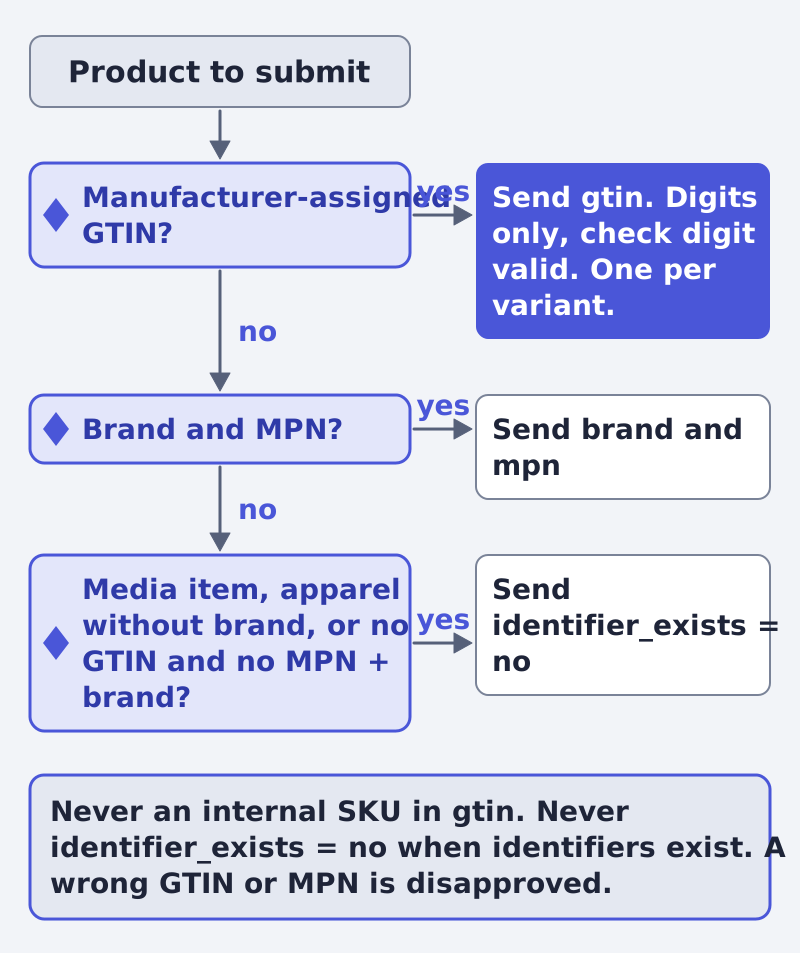
A GTIN is the number printed under a barcode. Google accepts UPC (12 digits), EAN (usually 13), JAN (8 or 13, Japan only), ISBN-13 for books and ITF-14 for multi-item packages. Use digits only, check the digit count and the check digit, and avoid the restricted prefixes 2, 02 and 04 and the coupon ranges (GTIN help). Each variant, such as another colour or size, needs its own GTIN.
The logic in short:
- The product has a manufacturer-assigned GTIN. Send it. Without it the product "may have limited visibility".
- It has no GTIN, but a brand and an MPN. Send
brandandmpn. The MPN is required only if there is no GTIN. - It has none of these. Set
identifier_existstono. Google allows that for a media item without a GTIN, an apparel item without a brand, or another item with no GTIN and no MPN and brand pair (product data specification). - Never invent one. Do not put an internal SKU in the GTIN field, and do not send
nowhen identifiers exist, or the product may be disapproved.
What goes wrong when something is missing
| Problem | What Google says happens | Source |
|---|---|---|
| A required attribute is missing | The product cannot serve in ads and free listings | 7052112 |
| Incorrect or inaccurate data | Disapprovals and limited eligibility | 7052112 |
| A wrong GTIN or MPN | The product is disapproved | 7052112, 160161 |
| A GTIN exists but was left out | Limited visibility | 160161 |
identifier_exists set to no wrongly |
The product may be disapproved | 7052112 |
To see these errors in your own feed before Google does, run it through our feed inspector and read Google Merchant Center feed errors. A clean feed is also the base of a shopping campaign: see what Performance Max is and how to set it up.
Keeping the data right over time
A feed is not a one-time job. Prices, stock and landing pages change, and Google checks that the submitted values match the page. Keep the id stable when you update a product: Google asks for it to stay the same across updates. Fill the optional attributes that describe your products well, since Google presents them as the way to improve ad performance, though the page does not put a number on it.
Framepx is an AI system that reads a product feed and turns it into ads. It works from the same attributes, so a feed that passes Merchant Center is also the better starting point there; see how it works.
Frequently asked questions
Which attributes are required for every product?
id, title, description, link, image_link, availability and price (product data specification).
Do I need a GTIN for every product?
No. Google strongly recommends one when the product has a manufacturer-assigned GTIN, and says you need not send one when none is assigned. A wrong value causes disapproval (GTIN help).
Is brand always required?
For all new products except movies, books and music recordings. Placeholders such as "Generic" are not accepted (product data specification).
What happens if a required attribute is missing?
The product cannot serve in ads and free listings until you submit it (product data specification).
Written by
Framepx team, Editorial team
The Framepx editorial team writes for brands, marketers and agencies about ad platforms, measurement, creative and product feeds.