
A short product ad needs a clip of a few seconds, in vertical and square, with the product left exactly as it is. By the makers' own pages, every model below can give you more than a few seconds, but most pages do not state aspect ratios, so check that before you pick one.
We read these pages on 7 November 2026 and compare only what they say.
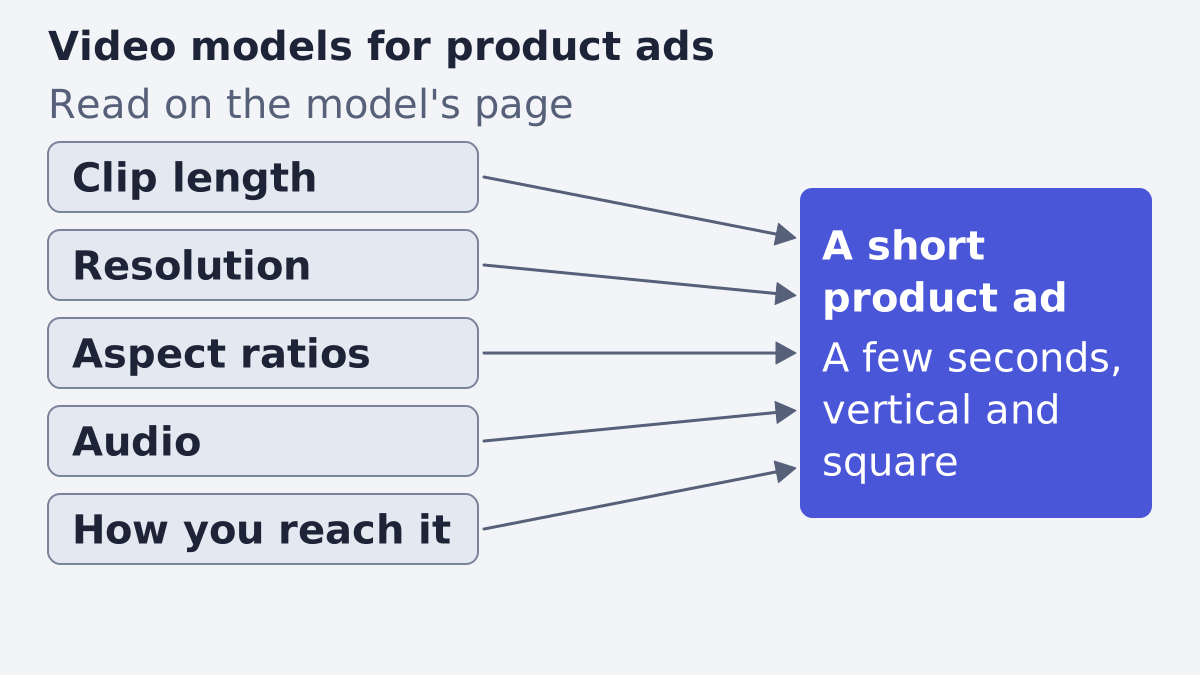
What a product ad needs
Before the models, the job. A product ad is not a film, and the list is short.
- A few seconds. Most feed and story placements play a short clip. A model that can make 30 seconds is not better for this job, only more than you need.
- Vertical and square. Stories and Reels are vertical, many feed placements are square. A model that only states a landscape size is a risk.
- The product kept exact. The shape, colour, logo and label of what you sell must not drift. A model that invents a new bottle is useless for an ad.
- Your text added afterwards. A brand name, a price or a legal line should be set as real text on top of the clip, not drawn by the model, because generated video text can come out wrong.
- Sound, sometimes. Many placements play muted, but a clip with its own audio saves a step when you want it.
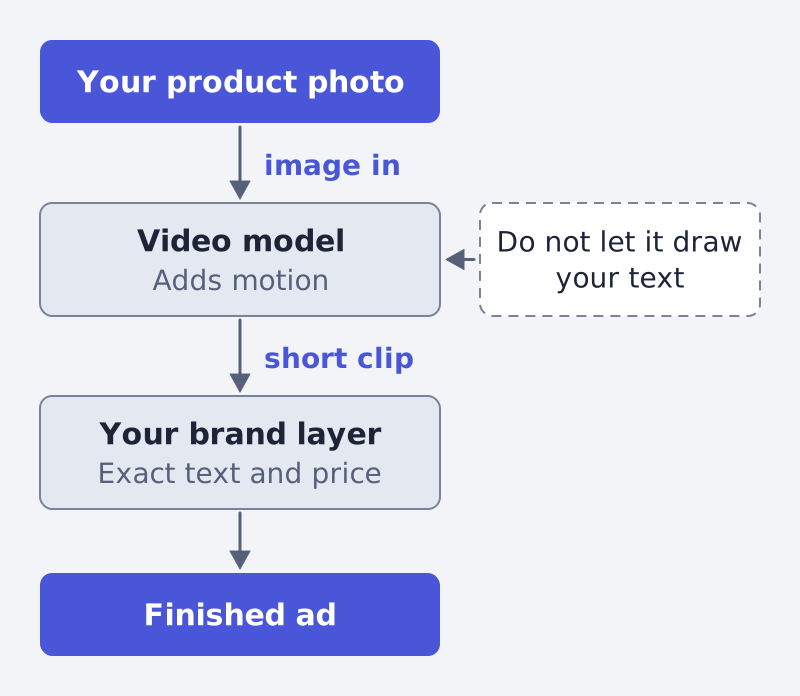
That last point shapes how you read a spec sheet. You are not asking which model draws the best picture. You are asking which one gives a short, correctly sized, audio-ready clip from your product image, and then you finish it yourself.
What we read, and what we left out
We opened the primary pages of four makers and kept only what a page states. Where a page is silent we say "not stated" and do not fill it from memory.
- Google. The Gemini API video page says the three Veo 3.1 preview models (
veo-3.1-generate-preview,veo-3.1-fast-generate-preview,veo-3.1-lite-generate-preview) were shut down on 22 October 2026 and points to Gemini Omni Flash (gemini-omni-1.2-flash) and to the GA models on Google's Enterprise Agent Platform (Google AI Studio docs). That page states no Veo clip length, resolution or aspect ratio, so Veo is not in the table. - OpenAI. The Sora video guide says the Sora 2 models and the Videos API "were shut down on September 24, 2026" and that no one-to-one replacement API is available (OpenAI docs). Sora is not in the table.
- Runway. Its developer docs list many video models, including ones from other makers, with duration, resolution and a price per second (Runway models). Runway's own Gen-4.5 and Gen-4 Turbo entries give no clip length, resolution or audio, so they are left out. We kept the newest model of each family on the page that states a clip length.
- Lightricks. The LTX-Video repository describes the open LTX models (GitHub).
We did not read the pages of Kling, Seedance, WAN or HappyHorse at their own makers, so for those four the facts come from Runway's page, and we say so. We also did not test any model: this is a reading of stated specs, not a quality ranking.
The comparison
| Model | Clip length | Resolution | Audio |
|---|---|---|---|
| Gemini Omni Flash | 3 to 15 seconds | 360p to 4K (Omni 1.2 on Runway's page); Google's page: not stated | Native audio |
| Kling 4.0 | 3 to 30 seconds | 720p, 1080p | Included, no toggle (Runway pricing page) |
| Seedance 2.5 | Up to 30 seconds | 480p, 720p, 1080p | An audio setting, audio references |
| WAN 3.0 | 2 to 30 seconds | 480p, 720p, 1080p | Native audio |
| HappyHorse 1.0 | 3 to 15 seconds | 720p, 1080p (Runway pricing page) | Native audio |
| LTX-2 / LTX-2.5 | LTX-2: audio "up to 10 seconds"; LTX-2.5: not stated | LTX-2: native 4K at up to 50 fps (README); also a family claim | Synchronized audio and video |
The same models again, by maker, stated aspect ratios, how you reach each one and where we read it.
| Model | Maker | Aspect ratios | How to reach it | Source |
|---|---|---|---|---|
| Gemini Omni Flash | Not stated | Gemini API; also Runway API | Google, Runway | |
| Kling 4.0 | Kling | Not stated | Runway API | Runway, Runway pricing |
| Seedance 2.5 | ByteDance | 16:9 and 9:16 named in the draft-mode notes | Runway API | Runway |
| WAN 3.0 | Alibaba | Not stated | Runway API | Runway |
| HappyHorse 1.0 | Alibaba | "Ten output ratios", not listed | Runway API | Runway, Runway pricing |
| LTX-2 / LTX-2.5 | Lightricks | Not stated; see the LTX note | Open weights, run it yourself; also Lightricks' own API | GitHub |
LTX note: the v0.9.x guide says sizes divisible by 32 (others are padded), and the README lists API access (GitHub).
Read the table with three cautions. First, "not stated" means the page does not say, not that the model cannot. Second, the LTX numbers come from the README, which mixes LTX-2 and the family; the README states native 4K at up to 50 fps for LTX-2 in its announcement and as a general claim for the family, and it calls the older v0.9.x line "legacy" and "no longer under active development." Third, the Gemini Omni Flash resolution comes from a different page than its clip length, which is why both are named.
Clip length
For a product ad the stated maximum is a ceiling, not a target. Still, it shows how the models differ.
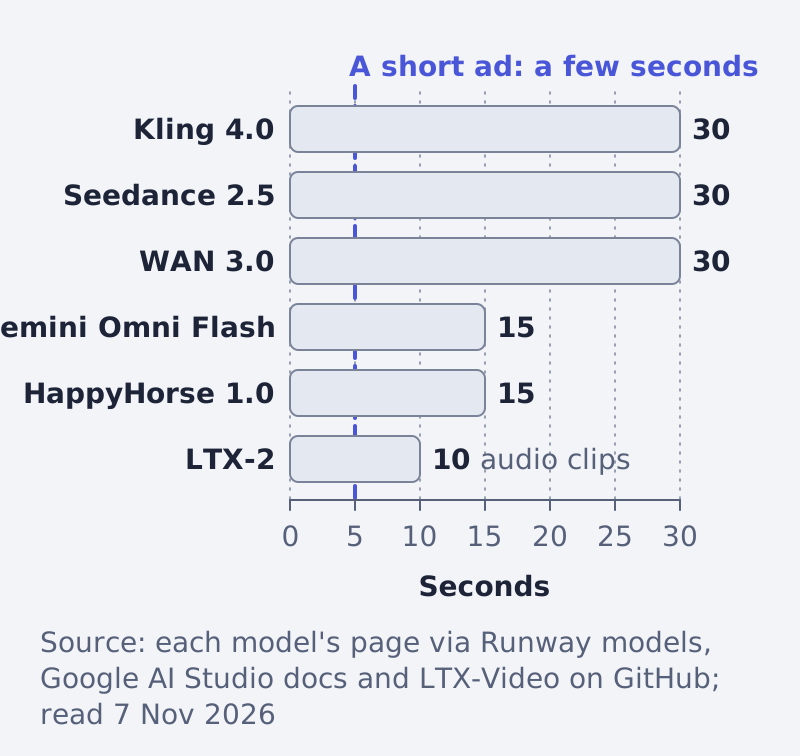
Three models state up to 30 seconds, two state 15 and LTX-2 states 10 (Runway models, Google, GitHub). All of them clear the few seconds a product ad needs. So length is not the deciding fact here. Resolution, ratios and the way you reach the model are.
Resolution and aspect ratio
Resolution is stated for most rows, from 480p up to 4K. Aspect ratio is the weak spot. Only HappyHorse 1.0 gives a count (ten output ratios, not listed), and the Seedance 2.5 notes name 16:9 and 9:16 (Runway models). Runway's docs also show a 1280:720 example, but they present it as an example value, not a list of options.
For vertical and square work this matters. Before you commit to a model, open its API reference and check the ratio or size parameter. If it accepts only a landscape size, plan a crop, which costs you framing and resolution. A clip generated at the right ratio from the start keeps your product centred.
Audio
Gemini Omni Flash, WAN 3.0, HappyHorse 1.0 and LTX state native or synchronized audio. Seedance 2.5 has an audio setting and takes audio references (Runway models). Kling 4.0's model row is silent on audio, but Runway's pricing page says it includes audio and has no audio toggle (Runway pricing).
For a product ad, built-in sound is a convenience. If your clip will be a muted feed placement, or you plan to lay a brand sound over it, this fact matters less than ratio and product accuracy.
How you reach it
There are three roads, and they suit different teams.
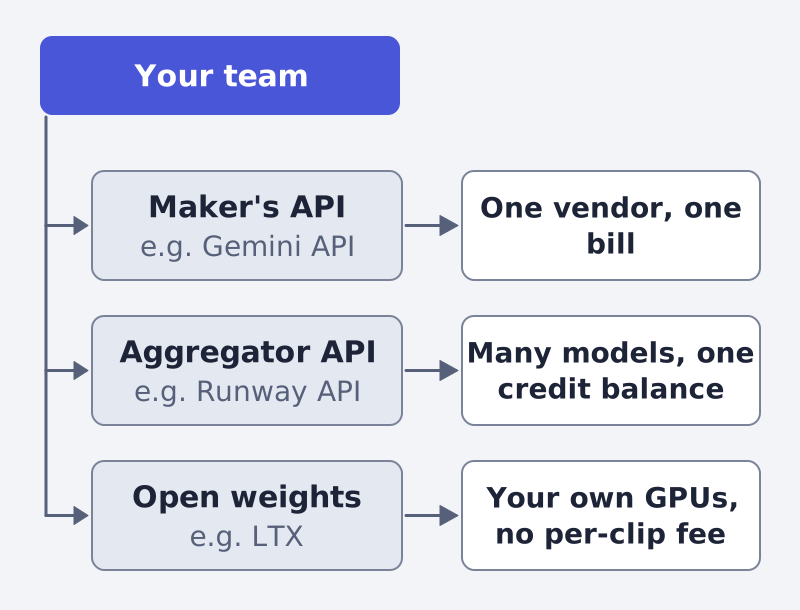
- The maker's API. Google offers Gemini Omni Flash in the Gemini API, with multi-turn refinement through the Interactions API (Google).
- An aggregator. Runway's API puts many models, including Gemini Omni Flash and the other Runway rows in the table, behind one interface and one credit balance (Runway models).
- Open weights. The LTX-Video repository's code is Apache-2.0; LTX-2 and LTX-2.5 weights come under community licences you must read for commercial use (GitHub). You run it on your own GPUs, so there is no per-clip fee but there is hardware to look after.
What it costs, where a page says
Most makers' pages do not state prices. Runway's pricing page does: credits cost $0.01 each, and it lists credits per second. For example, Seedance 2.5 is 20 credits per second at 480p, 30 at 720p and 68 at 1080p; WAN 3.0 is 5, 10 and 20; Gemini Omni 1.2 Flash is 2 at 360p, 7 at 720p and 10 at 1080p (Runway pricing, read 7 November 2026). At those rates, a five-second 1080p clip is about $3.40 on Seedance 2.5 and $0.50 on Gemini Omni 1.2 Flash: our arithmetic from the stated rates, before reference and keyframe charges. Prices change, so read the page on the day you plan a budget.
How to choose
- Write down the ratios you need: 9:16 and 1:1 first.
- Open each candidate's API reference and confirm those ratios.
- Pick the road: maker, aggregator or open weights.
- Make one clip of the same product from each, at the length you will really use.
- Judge the product's shape and label, not the style. Then add your own text and price.
To judge the finished ad before you spend, try our free creative score. For another tool you steer yourself, read what Claude Code is and what a marketer can do with it.
If you would rather not pick a model at all, that is what Framepx does: our AI system turns a product feed into image and video ads, with the product kept exact. Here is how it works.
FAQ
Which model is best for a product ad? We do not rank them. The pages state specs, not quality for your product. Use the checklist above and test one clip from each candidate.
Do I need a clip longer than 15 seconds? For a feed or story ad, usually not. Every model in the table states at least 10 seconds.
Can the model write my price on the video? Better not to rely on it. Add the brand name, price and legal line as real text after the model has produced the clip.
What happened to Veo and Sora? The Gemini API page says the Veo 3.1 previews were shut down on 22 October 2026, and OpenAI's page says Sora 2 and its Videos API were shut down on 24 September 2026 (Google, OpenAI). The Google page also points to the GA models on Google's Enterprise Agent Platform, so Veo is not gone. Veo 3.1 still appears on Runway's pages, but that page gives no clip length or resolution for it.
Sources
All read on 7 November 2026.
Written by
Framepx team, Editorial team
The Framepx editorial team writes for brands, marketers and agencies about ad platforms, measurement, creative and product feeds.